

Ir para conteúdo
View in the app

A better way to browse. Learn more.

Clube Autoluiz

A full-screen app on your home screen with push notifications, badges and more.

To install this app on iOS and iPadOS
  1. Tap the Share icon in Safari
  2. Scroll the menu and tap Add to Home Screen.
  3. Tap Add in the top-right corner.
To install this app on Android
  1. Tap the 3-dot menu (⋮) in the top-right corner of the browser.
  2. Tap Add to Home screen or Install app.
  3. Confirm by tapping Install.

Marcos Dagostin

Administrators
  • Registro em

  • Última visita

Tudo que Marcos Dagostin postou

  1. Marcos Dagostin respondeu ao tópico de Fernando em CHEVROLET
    Função Emparelhamento dentro da Calculadora Editec, Painel com BCM.
  2. Marcos Dagostin respondeu ao tópico de Fernando em CHEVROLET
    Função Emparelhamento dentro da Calculadora Editec, EPS com ECU.
  3. Marcos Dagostin respondeu ao tópico de Fernando em CHEVROLET
    Função Emparelhamento dentro da Calculadora Editec, ECU com BCM.
  4. Marcos Dagostin respondeu ao tópico de Fernando em CHEVROLET
    Função Emparelhamento dentro da Calculadora Editec, TCM com ECU.
  5. Marcos Dagostin respondeu ao tópico de Fernando em CHEVROLET
    Função Emparelhamento dentro da Calculadora Editec, BCM com ECU.
  6. Marcos Dagostin respondeu ao tópico de Fernando em CHEVROLET
    Função Emparelhamento dentro da Calculadora Editec, TCM com ECU.
  7. Função Emparelhamento dentro da Calculadora Editec, TCM com ECU.
  8. Marcos Dagostin postou um tópico no fórum em BMW
    Informações Gerais:Tipo de sistema: Imobilizador BMW (EWS - Electronic Immobilizer) Modelos: EWS1, EWS2, EWS3 Processador utilizado: Motorola MC68HC11EA9 Processador MC68HC11EA9:Família: Motorola HC11 Arquitetura: 8 bits EEPROM interna: Sim (utilizada para armazenar dados do transponder e sincronização com ECU) Comunicação: Necessária leitura por ferramenta específica (via BDM ou soquete) Procedimentos para Transponder:1. Leitura da ImmoBox:Retirar a ImmoBox do veículo. Identificar o processador MC68HC11EA9. Realizar a leitura da memória EEPROM do processador com ferramenta compatível (ex: Xprog, UPA-USB, Orange5). 2. Gerar Transponder:Utilizar software compatível (Tango, Zed-Bull, VVDI, etc.). Carregar o arquivo lido da ImmoBox. Selecionar a opção “gerar chave” ou “transponder”. Escrever o transponder virgem (geralmente do tipo PCF7935 ou equivalente). 3. Teste de Funcionamento:Reinstalar a ImmoBox no veículo. Testar partida com o novo transponder programado. Verificar se não há falhas na sincronização com ECU. Observações Importantes:A EWS3 possui criptografia mais avançada em comparação com EWS1/EWS2. Recomenda-se uso de transponders virgens. Backup da EEPROM antes de qualquer modificação é altamente recomendado. Uploading Attachment...
  9. Marcos Dagostin postou um tópico no fórum em RENAULT
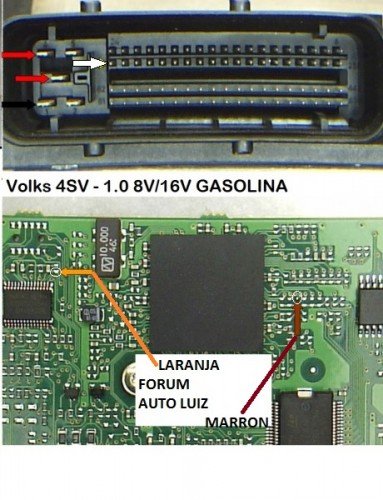
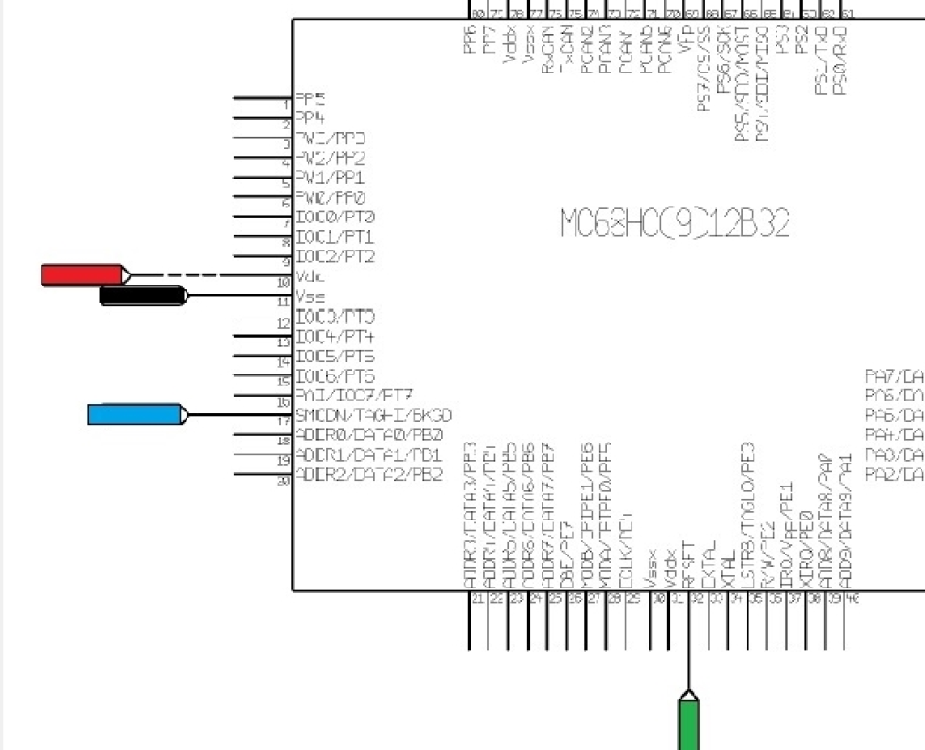
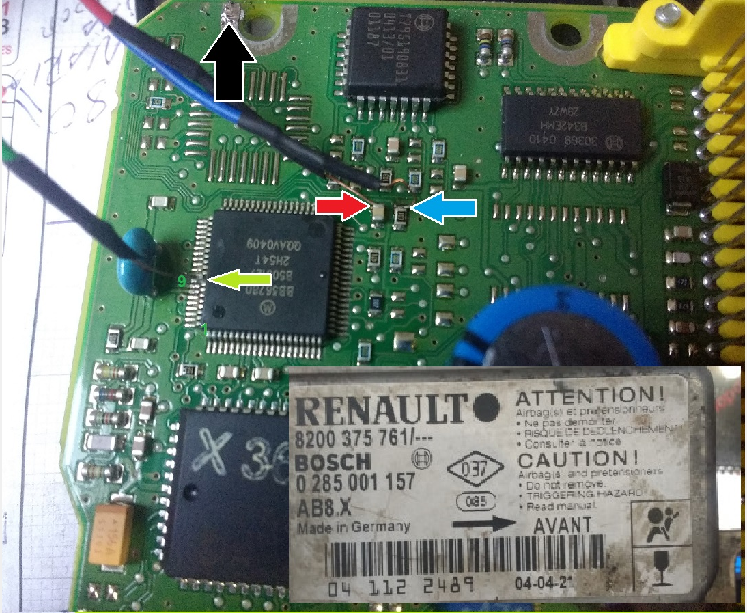
    🔧 Boot UPA – Processador MC68HC912B32 🔄 Conversor de Cabos UPA para VVDI COR (UPA) PINO (UPA) SIGLA (UPA) COR (VVDI) SIGLA (VVDI) MARROM 1 IRQ — — AMARELO 2 TDO MARROM TXD / TCK LARANJA 3 RDI LARANJA RXD ROXO 4 TCAP1 / TRST — — PRETO 5 VSS / GND PRETO VSS / GND AZUL 6 BKGD / PD3 VERDE TDO / FLMD1 VERDE 7 RESET AMARELO RESET BRANCO 8 PD4 / AN4 AZUL FLMD0 / TMS VERMELHO 9 VDD+ VERMELHO VCC
  10. 🔧 Boot UPA – Processador MC68HC912B32
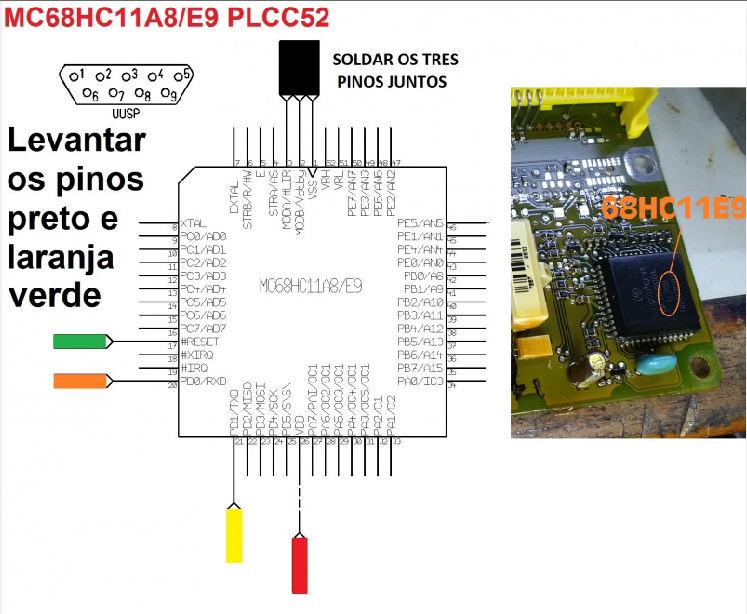
  11. 🔧 Boot UPA – Processador MC68HC11A8/E9 🔄 Conversor de Cabos UPA para VVDI COR (UPA) PINO (UPA) SIGLA (UPA) COR (VVDI) SIGLA (VVDI) MARROM 1 IRQ — — AMARELO 2 TDO MARROM TXD / TCK LARANJA 3 RDI LARANJA RXD ROXO 4 TCAP1 / TRST — — PRETO 5 VSS / GND PRETO VSS / GND AZUL 6 BKGD / PD3 VERDE TDO / FLMD1 VERDE 7 RESET AMARELO RESET BRANCO 8 PD4 / AN4 AZUL FLMD0 / TMS VERMELHO 9 VDD+ VERMELHO VCC
  12. Marcos Dagostin postou um tópico no fórum em PEUGEOT CITROEN
    🔧 Boot UPA – Processador SPC560x 🔄 Conversor de Cabos UPA para VVDI COR (UPA) PINO (UPA) SIGLA (UPA) COR (VVDI) SIGLA (VVDI) MARROM 1 IRQ — — AMARELO 2 TDO MARROM TXD / TCK LARANJA 3 RDI LARANJA RXD ROXO 4 TCAP1 / TRST — — PRETO 5 VSS / GND PRETO VSS / GND AZUL 6 BKGD / PD3 VERDE TDO / FLMD1 VERDE 7 RESET AMARELO RESET BRANCO 8 PD4 / AN4 AZUL FLMD0 / TMS VERMELHO 9 VDD+ VERMELHO VCC
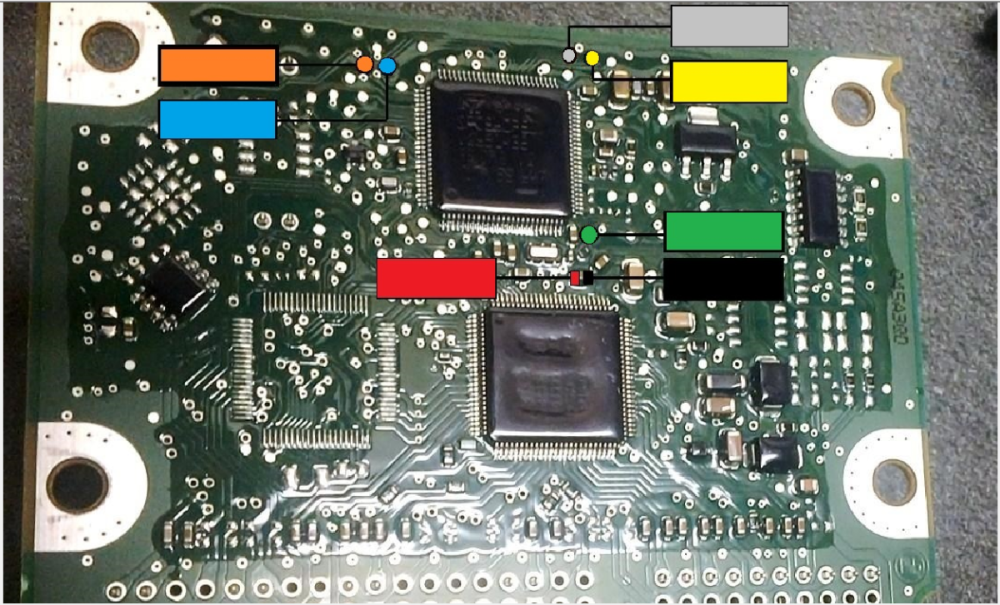
  13. Marcos Dagostin postou um tópico no fórum em PEUGEOT CITROEN
    comment_2220 🔧 Boot UPA – Processador 70F3454 🔄 Conversor de Cabos UPA para VVDI COR (UPA) PINO (UPA) SIGLA (UPA) COR (VVDI) SIGLA (VVDI) MARROM 1 IRQ — — AMARELO 2 TDO MARROM TXD / TCK LARANJA 3 RDI LARANJA RXD ROXO 4 TCAP1 / TRST — — PRETO 5 VSS / GND PRETO VSS / GND AZUL 6 BKGD / PD3 VERDE TDO / FLMD1 VERDE 7 RESET AMARELO RESET BRANCO 8 PD4 / AN4 AZUL FLMD0 / TMS VERMELHO 9 VDD+ VERMELHO VCC
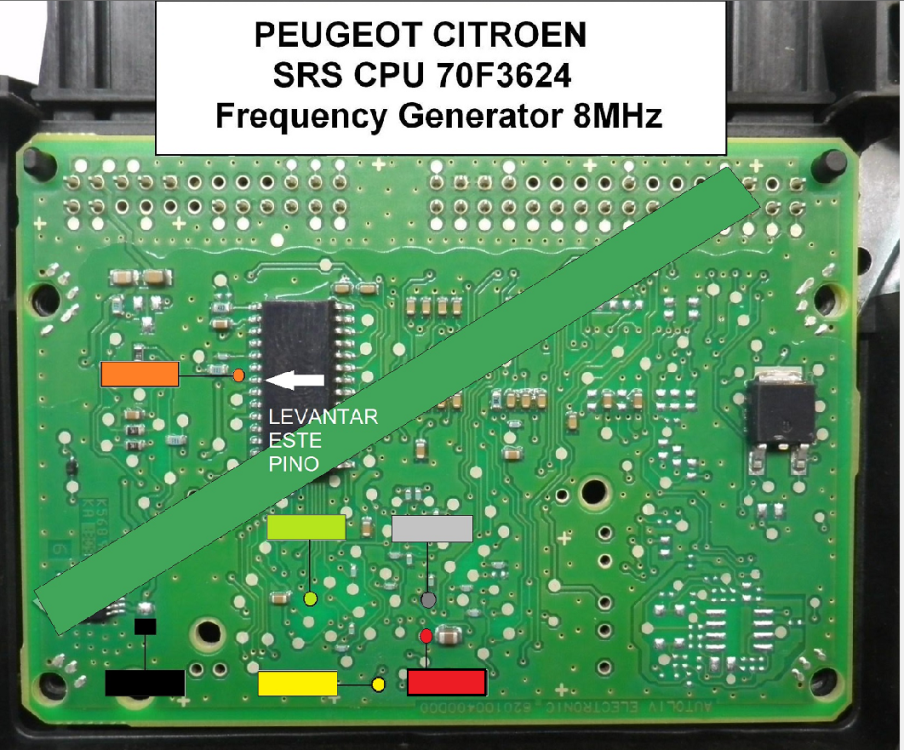
  14. Marcos Dagostin postou um tópico no fórum em RENAULT
    🔧 Boot UPA – Processador SPC560P50 🔄 Conversor de Cabos UPA para VVDI COR (UPA) PINO (UPA) SIGLA (UPA) COR (VVDI) SIGLA (VVDI) MARROM 1 IRQ — — AMARELO 2 TDO MARROM TXD / TCK LARANJA 3 RDI LARANJA RXD ROXO 4 TCAP1 / TRST — — PRETO 5 VSS / GND PRETO VSS / GND AZUL 6 BKGD / PD3 VERDE TDO / FLMD1 VERDE 7 RESET AMARELO RESET BRANCO 8 PD4 / AN4 AZUL FLMD0 / TMS VERMELHO 9 VDD+ VERMELHO VCC

  15. Marcos Dagostin postou um tópico no fórum em RENAULT
    🔧 Boot UPA – Processador XC2336B-40F 🔄 Conversor de Cabos UPA para VVDI COR (UPA) PINO (UPA) SIGLA (UPA) COR (VVDI) SIGLA (VVDI) MARROM 1 IRQ — — AMARELO 2 TDO MARROM TXD / TCK LARANJA 3 RDI LARANJA RXD ROXO 4 TCAP1 / TRST — — PRETO 5 VSS / GND PRETO VSS / GND AZUL 6 BKGD / PD3 VERDE TDO / FLMD1 VERDE 7 RESET AMARELO RESET BRANCO 8 PD4 / AN4 AZUL FLMD0 / TMS VERMELHO 9 VDD+ VERMELHO VCC
  16. 🔧 Boot UPA – Processador MC9S12DG128 🔄 Conversor de Cabos UPA para VVDI COR (UPA) PINO (UPA) SIGLA (UPA) COR (VVDI) SIGLA (VVDI) MARROM 1 IRQ — — AMARELO 2 TDO MARROM TXD / TCK LARANJA 3 RDI LARANJA RXD ROXO 4 TCAP1 / TRST — — PRETO 5 VSS / GND PRETO VSS / GND AZUL 6 BKGD / PD3 VERDE TDO / FLMD1 VERDE 7 RESET AMARELO RESET BRANCO 8 PD4 / AN4 AZUL FLMD0 / TMS VERMELHO 9 VDD+ VERMELHO VCC
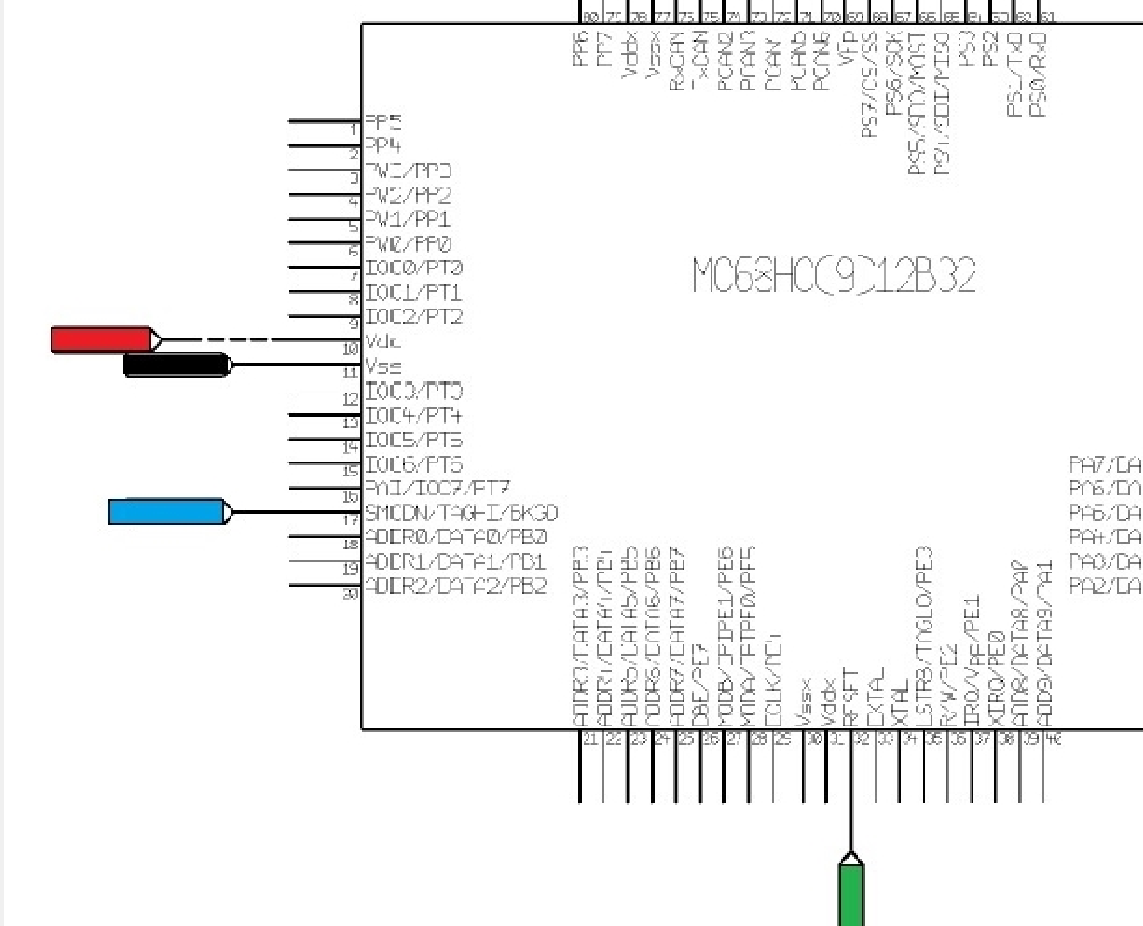
  17. 🔧 Boot UPA – Processador CR16MCT9 🔄 Conversor de Cabos UPA para VVDI COR (UPA) PINO (UPA) SIGLA (UPA) COR (VVDI) SIGLA (VVDI) MARROM 1 IRQ — — AMARELO 2 TDO MARROM TXD / TCK LARANJA 3 RDI LARANJA RXD ROXO 4 TCAP1 / TRST — — PRETO 5 VSS / GND PRETO VSS / GND AZUL 6 BKGD / PD3 VERDE TDO / FLMD1 VERDE 7 RESET AMARELO RESET BRANCO 8 PD4 / AN4 AZUL FLMD0 / TMS VERMELHO 9 VDD+ VERMELHO VCC
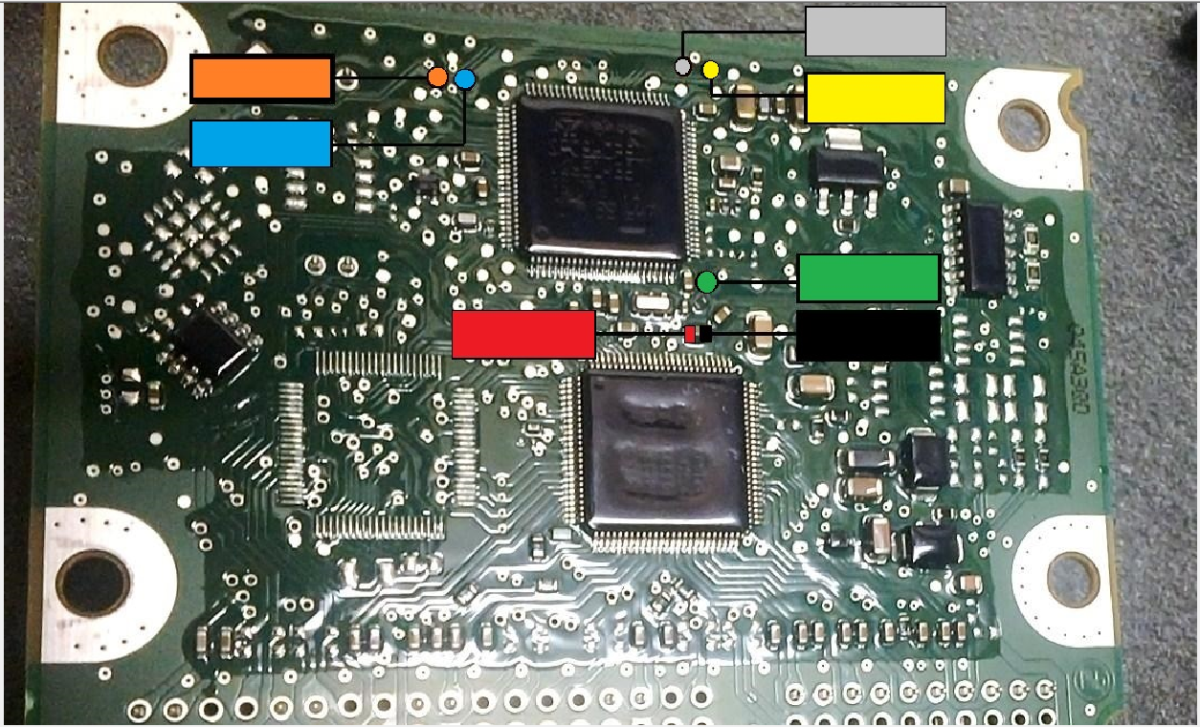
  18. 🔧 Boot UPA – Processador MC68HC08AZ32A
  19. Marcos Dagostin postou um tópico no fórum em VOLKSWAGEN AUDI
    🔧 Boot UPA – Processador R5F21346P 🔄 Conversor de Cabos UPA para VVDI COR (UPA) PINO (UPA) SIGLA (UPA) COR (VVDI) SIGLA (VVDI) MARROM 1 IRQ — — AMARELO 2 TDO MARROM TXD / TCK LARANJA 3 RDI LARANJA RXD ROXO 4 TCAP1 / TRST — — PRETO 5 VSS / GND PRETO VSS / GND AZUL 6 BKGD / PD3 VERDE TDO / FLMD1 VERDE 7 RESET AMARELO RESET BRANCO 8 PD4 / AN4 AZUL FLMD0 / TMS VERMELHO 9 VDD+ VERMELHO VCC
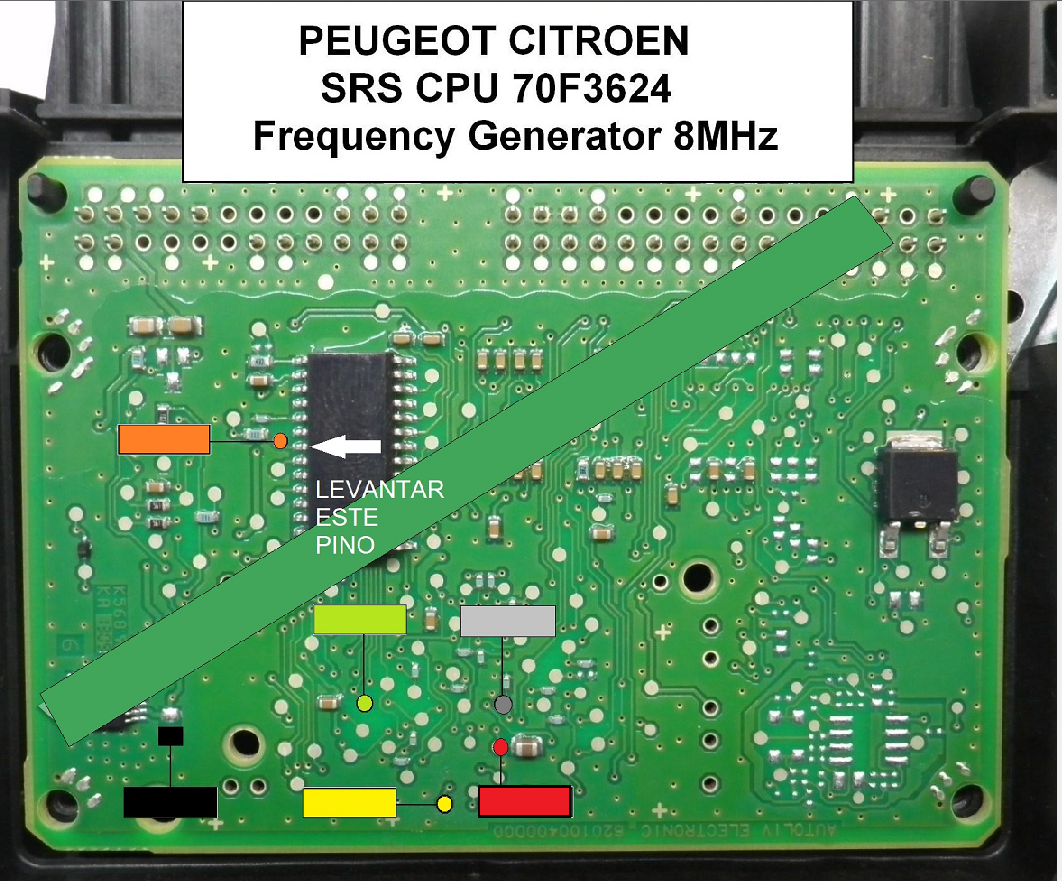
  20. 🔧 Boot UPA – Processador 70F3466/70F3424 🔄 Conversor de Cabos UPA + VVDI + CPT Program Estes são algumas numerações para este Processador: SINAL / USO UPA (pino - cor) VVDI (cor - sigla) CPT Program (pino - cor) IRQ 1 - MARROM — TDO / TCK 2 - AMARELO MARROM - TXD / TCK 4 - AZUL 1 - BRANCO (R7F) RDI / RXD 3 - LARANJA LARANJA - RXD 8 - VERMELHO TCAP1 / TRST 4 - ROXO — 5 - VERDE VSS / GND 5 - PRETO PRETO - VSS / GND 9 - MARROM BKGD / PD3 / TDO 6 - AZUL VERDE - TDO / FLMD1 3 - ROXO RESET 7 - VERDE AMARELO - RESET 6 - AMARELO PD4 / TMS (PD4/AN4) 8 - BRANCO ou CINZA AZUL - FLMD0 / TMS 7 - LARANJA VDD+ / VCC (+5V) 9 - VERMELHO VERMELHO - VCC 2 - CINZA Feita pelo Master Fernando. Em boots 12V+ com alimentação externa, não ligar o 5V+ do UPA (vermelho). Alimente apenas com o negativo (preto).
  21. 🔧 Boot UPA – Processador R5F64525 🔄 Conversor de Cabos UPA para VVDI COR (UPA) PINO (UPA) SIGLA (UPA) COR (VVDI) SIGLA (VVDI) MARROM 1 IRQ — — AMARELO 2 TDO MARROM TXD / TCK LARANJA 3 RDI LARANJA RXD ROXO 4 TCAP1 / TRST — — PRETO 5 VSS / GND PRETO VSS / GND AZUL 6 BKGD / PD3 VERDE TDO / FLMD1 VERDE 7 RESET AMARELO RESET BRANCO 8 PD4 / AN4 AZUL FLMD0 / TMS VERMELHO 9 VDD+ VERMELHO VCC
  22. 🔧 Boot UPA – Processador SPC560x 🔄 Conversor de Cabos UPA para VVDI COR (UPA) PINO (UPA) SIGLA (UPA) COR (VVDI) SIGLA (VVDI) MARROM 1 IRQ — — AMARELO 2 TDO MARROM TXD / TCK LARANJA 3 RDI LARANJA RXD ROXO 4 TCAP1 / TRST — — PRETO 5 VSS / GND PRETO VSS / GND AZUL 6 BKGD / PD3 VERDE TDO / FLMD1 VERDE 7 RESET AMARELO RESET BRANCO 8 PD4 / AN4 AZUL FLMD0 / TMS VERMELHO 9 VDD+ VERMELHO VCC
  23. 🔧 Boot UPA – Processador SPC560x 🔄 Conversor de Cabos UPA para VVDI COR (UPA) PINO (UPA) SIGLA (UPA) COR (VVDI) SIGLA (VVDI) MARROM 1 IRQ — — AMARELO 2 TDO MARROM TXD / TCK LARANJA 3 RDI LARANJA RXD ROXO 4 TCAP1 / TRST — — PRETO 5 VSS / GND PRETO VSS / GND AZUL 6 BKGD / PD3 VERDE TDO / FLMD1 VERDE 7 RESET AMARELO RESET BRANCO 8 PD4 / AN4 AZUL FLMD0 / TMS VERMELHO 9 VDD+ VERMELHO VCC
  24. 🔧 Boot UPA – Processador MPC560x
  25. 🔧 Boot UPA – Processador R7F701018

Account

Navigation

Pesquisar

Pesquisar

Configure browser push notifications

Chrome (Android)
  1. Tap the lock icon next to the address bar.
  2. Tap Permissions → Notifications.
  3. Adjust your preference.
Chrome (Desktop)
  1. Click the padlock icon in the address bar.
  2. Select Site settings.
  3. Find Notifications and adjust your preference.